
Every site here is live the moment it is published, on an address that looks like yourbusiness.example-host.com. It works. It is secure. Customers can buy from it and book on it, and nothing about it is a trial.
So the question is not whether the free address is good enough to launch on. It is when the paid one starts paying for itself.
What actually changes
Not the site. The same pages, the same shop, the same booking form. Four things change around it.
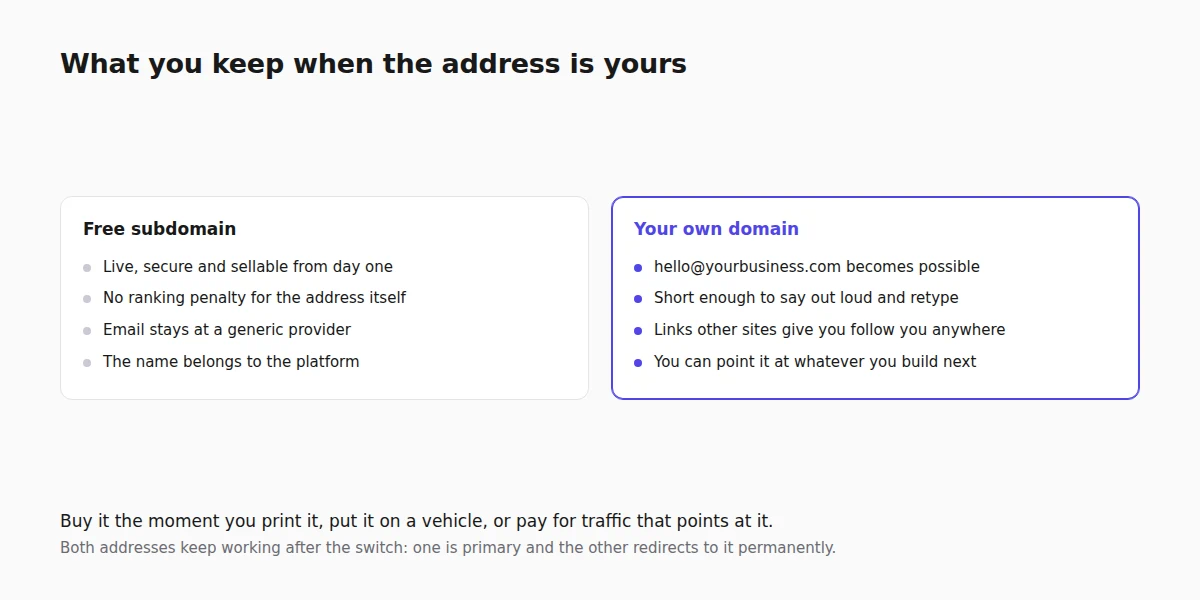
- What it says about you. A business card with a hosting provider's name in the middle of the address reads as temporary, and in some trades that costs you enquiries you never hear about.
- Email. You cannot have
[protected]without owningyourbusiness.com. For most businesses this is the real reason to buy one, and it is worth more than the website effect. - Ownership of the address. A domain you register is yours to point wherever you like. Everything you build on it, including the links other sites give you, follows you if you ever move.
- Word of mouth. People remember and retype short addresses. That is the entire practical difference for a business whose customers arrive by recommendation.
What does not change
Two myths worth killing, because they cause a lot of premature spending.
A free subdomain is not penalised in search. There is no ranking discount for the address. A site on a subdomain that answers real questions will outrank a site on a premium domain that says nothing. What a custom domain gives you is a cleaner start for building signals over the long term, not a boost this month.
Neither is less secure. Both are served over HTTPS with a valid certificate, issued and renewed for you either way. The padlock is not the difference.
When to switch
The honest answer is: as soon as the business is real, and it is fine to launch before then.
Stay on the free address while you are testing whether the business exists at all, building the site before opening, or running something genuinely temporary such as a single event. Buy the domain the moment you print anything, put the address on a vehicle, start paying for advertising that points at it, or want an email address at your own name. Those are the moments where the cost of changing later exceeds the cost of buying now.
The cost itself is small, usually a little more than a monthly coffee habit for a year, and the main trap is the first-year discount that renews at four times the price. Read the renewal rate, not the headline. Choosing the name itself is its own decision, covered in how to choose a domain name.
How the switch works
Three steps, and only one of them needs care.
- Register the domain with any registrar. You are buying the name, not hosting; the site stays where it is.
- Point it at the site. You add DNS records at the registrar, then the platform checks them. This is the step that generates almost all the confusion, because DNS changes are not instant and the check can fail for perfectly boring reasons: the record was added to the wrong host name, or an old record is still in place. Connecting a custom domain is the walkthrough, and my custom domain will not verify covers what to do when it does not.
- Wait for the certificate. Once the domain verifies, HTTPS is issued automatically. This is usually minutes, not hours, and until it completes the address may show a warning. That is expected, not broken.
Both addresses keep working afterwards, which is the part people get wrong when they panic about losing traffic. One host is the primary and everything else redirects there permanently, so anybody arriving on the old subdomain lands on the right page at the new address, and search engines are told the move is permanent rather than being shown two copies of your site.
The bit worth being careful about
If your subdomain has been live long enough to have collected links, rankings or customers who bookmarked it, treat the switch as a migration rather than a setting change.
That means: change the address everywhere you control it, on your Google Business Profile, your social profiles, your email signature and any directory listing, then watch search performance for a few weeks so a drop is noticed while it is still fixable. The redirect does the technical part. The listings you forgot are what costs you traffic. The full checklist is in moving a website without losing rankings.
If the site is a week old with no inbound links, none of that applies. Point it and get on with your day. And if you have not built the site yet, it can be published on the free address first: that is what the free website builder page describes.
FAQ
Does a free subdomain hurt my Google rankings?
No. There is no ranking penalty for the address itself. A custom domain helps with trust and with building long-term signals you keep, not with this month's position.
Can I launch on the free subdomain and move later?
Yes, and it is a sensible order. Both addresses continue to work after the move, with the old one redirecting permanently to the new, so nothing is lost as long as you also update the listings you control.
How much does a domain cost?
Usually a modest annual fee. Watch the renewal price rather than the first-year offer, because the gap between them is often large.
Do I need separate hosting if I buy a domain?
No. You are buying the name only. The site stays where it is, and the domain is pointed at it with DNS records.
How long does it take to go live?
The DNS change is usually visible within an hour and can take longer to propagate everywhere. Once it verifies, the HTTPS certificate is issued automatically, normally within minutes.
Compare your options
- Webkio vs GoDaddy - if you are buying the domain and the site together.
- Webkio vs IONOS MyWebsite - the same question at IONOS.
- Webkio vs Hostinger Website Builder - and where hosting-led builders differ.