
The traffic a small business loses in a rebuild is almost never lost because the new site is worse. It is lost because twenty URLs that ranked stopped existing, and nothing told search engines where they went.
That damage is done in an afternoon and takes months to undo. It is also entirely avoidable with an hour of preparation.
Write the URL map before anything else
Before the new site exists, list every URL on the old one that matters: every page with search traffic, every page anybody links to, and every page customers have bookmarked. Against each, write the new URL.
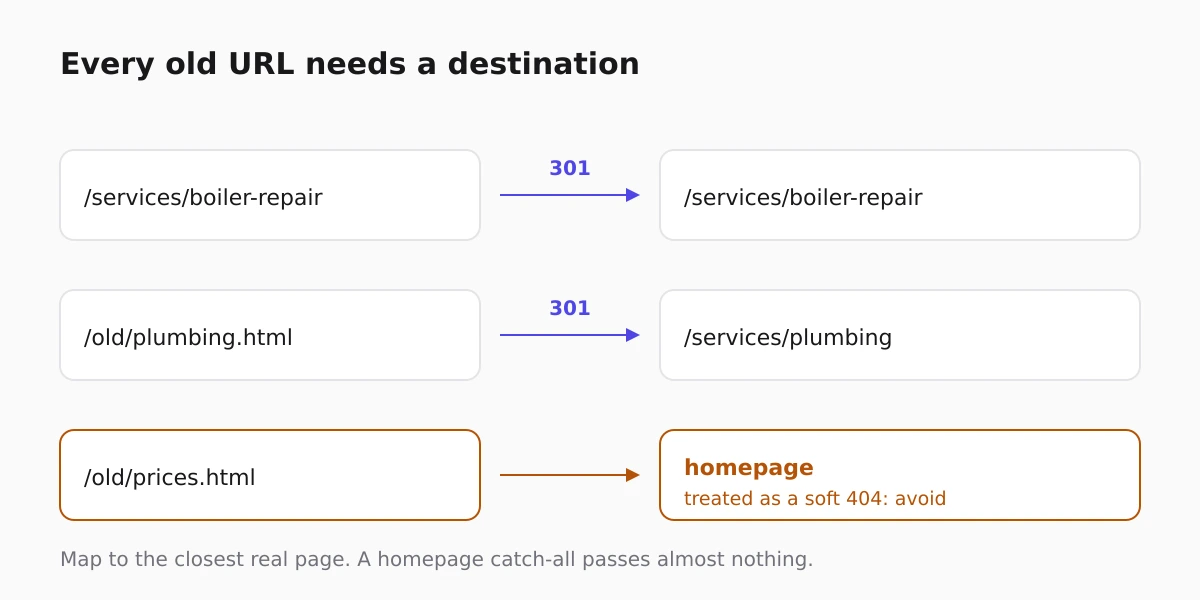
If a page has no equivalent, map it to the closest relevant page rather than the homepage. A homepage redirect for everything is read as a soft 404 and passes almost nothing.
Keep the URLs identical where you can
The cheapest migration is one where the addresses do not change. If the old site used /services/boiler-repair and the new one can too, use it, even if the new structure would have named it differently.
Every URL you keep is a redirect you do not have to write and a signal you do not have to transfer.
Redirect with 301, once
A 301 is permanent and passes ranking signals. A 302 says the move is temporary and does not. Chains of redirects, where the old URL points at a URL that points at another, lose value at each hop and slow the page.
On a site built here, renaming a published page writes the 301 for you: the old slug is recorded and served as a permanent redirect to the new one, so an internal rename does not silently break a link somebody shared. What still needs planning is a move from a different platform, where nothing knows about your old addresses.
Do not change everything at once
A rebuild, a domain change and a restructure at the same time makes diagnosis impossible when traffic drops. Move the site first, confirm it is stable for a few weeks, then change the domain, then restructure.
If the domain must change too, the new one needs to be connected properly and consistently. That process is covered in connect a custom domain.
Check the things that break quietly
- Internal links still pointing at old URLs, so visitors take an extra hop.
- The sitemap, still listing pages that no longer exist.
- Images, whose URLs changed even though the page did not.
- Analytics and search console, which need the new property before you can tell whether anything went wrong.
- The 404 log, which is the honest measure of what you missed.
A rebuilt site is also the moment page weight quietly doubles, so it is worth checking against website speed for small business owners before you call it done.
Expect a dip, then watch it close
Even a well-run migration usually dips for a week or two while pages are recrawled. What matters is the shape: a shallow dip that recovers is normal, a decline that keeps going means URLs are still unmapped.
Keep the old URL map for a year. The 404 log will keep finding stragglers, and each one is a link somebody still has. The general pre-launch sequence is in the website launch checklist.
FAQ
How long do redirects need to stay in place?
At least a year, and there is little cost in keeping them forever. Links from other sites do not expire, and neither do bookmarks.
Should everything redirect to the homepage?
No. A homepage redirect for a page that no longer exists is treated as a soft 404 and passes almost nothing. Map to the closest real page or return a genuine 404.
Will I lose rankings even if I do this properly?
Usually a short dip while pages are recrawled, then recovery. A persistent decline points at unmapped URLs rather than at the move itself.
Can I change the domain at the same time as the rebuild?
You can, but you lose the ability to tell which change caused a problem. Separate them by a few weeks if the traffic matters.
What about pages that ranked but I no longer want?
Redirect them to the nearest useful page. Deleting a page that earns visits throws away the one thing that took years to build.