A photograph taken on a modern phone is often four thousand pixels wide and several megabytes. Displayed in a column eight hundred pixels wide, every one of those extra pixels is downloaded and thrown away.
On a gallery page with twenty of them, that is the difference between a site that loads on mobile data and one that does not.
Size to the space, not to the camera
The first question is how wide the image will actually be displayed. A full-width hero on a phone needs around 1200 pixels for a sharp result on a high-density screen. A thumbnail in a three-column grid needs about 400.
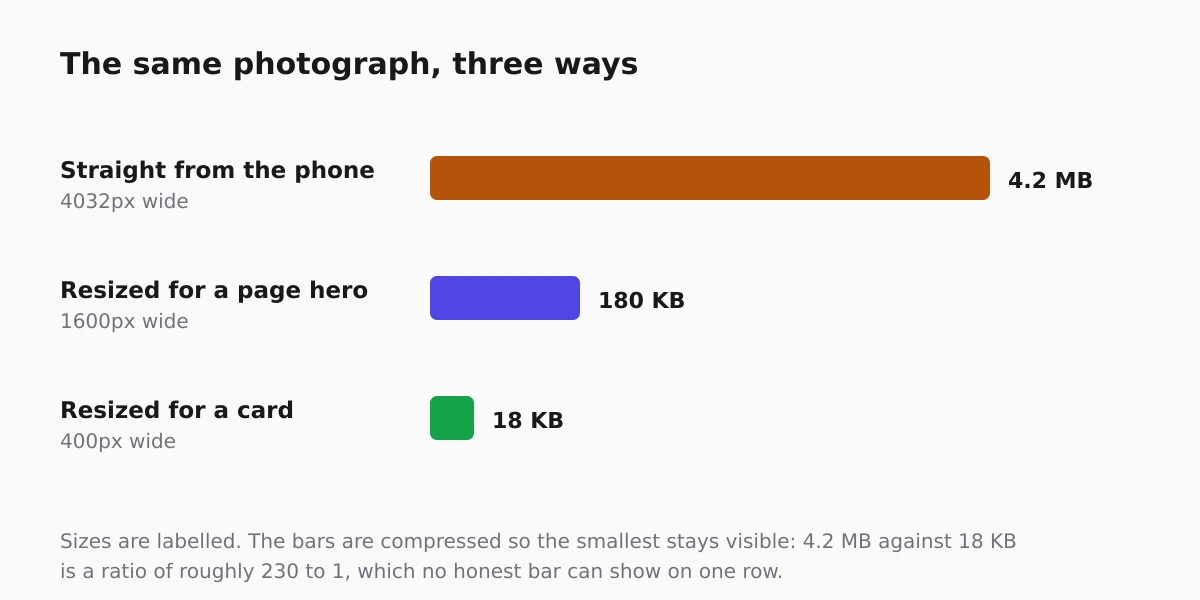
Resizing before uploading is the single highest-value habit in this article. Everything else on this page is a refinement of it.
Pick the format on purpose
- WebP for photographs, which is smaller than JPEG at the same visual quality and supported everywhere that matters.
- JPEG as a fallback where something old must read it.
- PNG only for graphics with flat colour or transparency, never for photographs.
- SVG for logos, icons and diagrams, because it stays sharp at any size and is usually tiny.
A photograph saved as PNG is often ten times larger than it needs to be, and it is one of the most common mistakes on small sites.
Let the browser choose a size
Serving one large file to every device wastes bandwidth on phones and is the usual reason a site feels slow on mobile. The fix is to publish several widths and let the browser pick, which is what a responsive image set does.
On sites built here the smaller widths are generated for the images that ship with the platform, so a card loads a card-sized file rather than a hero-sized one. For your own uploads, the same principle applies: upload a sensible size rather than the original. The practical ceilings are in upload limits.
Write alt text like a description, not a keyword list
Alt text exists so somebody who cannot see the image still gets the information. Describe what is in it, in a sentence, the way you would to a person on the phone.
"Front of the workshop with the roller door open" is useful. "plumber plumbing emergency plumber London" helps nobody, and search engines have been ignoring that pattern for a decade.
Decorative images that carry no information should have empty alt text so screen readers skip them rather than reading a filename aloud. The same reasoning drives the accessibility rules in the European Accessibility Act guide.
Keep the originals somewhere else
Once an image is resized for the web, the web copy is not a good archive. Keep full-resolution originals off the site, so you can re-cut them later when a layout changes.
The rest of the speed picture, once images are handled, is in website speed for small business owners.
FAQ
What size should I upload?
Around 1600 pixels wide for anything full width, 800 for in-page images, 400 for thumbnails. Beyond that you are shipping pixels nobody sees.
Is WebP safe to use now?
Yes. Every current browser supports it, and it typically saves 25 to 35 percent against JPEG at equivalent quality.
Does image file name matter for SEO?
A little, and it costs nothing to name a file descriptively rather than DSC_0431. It matters far less than alt text and page context.
Should every image have alt text?
Every informative image, yes. Purely decorative ones should have empty alt text so assistive technology skips them.
Do I need a CDN for images?
Rarely at small scale. Correct sizing and format gets you most of the benefit; a CDN mainly helps when visitors are far from the server.