Speed advice for small business sites is usually written for engineers running large applications. Most of it does not apply, and the parts that do can be reduced to a short list.
The thing to understand first: for a small site, slow almost always means images, third-party scripts, or distance. Rarely anything else.
The numbers worth knowing
Search engines measure three things a visitor can feel.
- LCP, how long until the biggest thing on screen appears. Aim under 2.5 seconds.
- CLS, how much the page jumps around while loading. Aim under 0.1.
- INP, how quickly the page responds when tapped. Aim under 200 milliseconds.
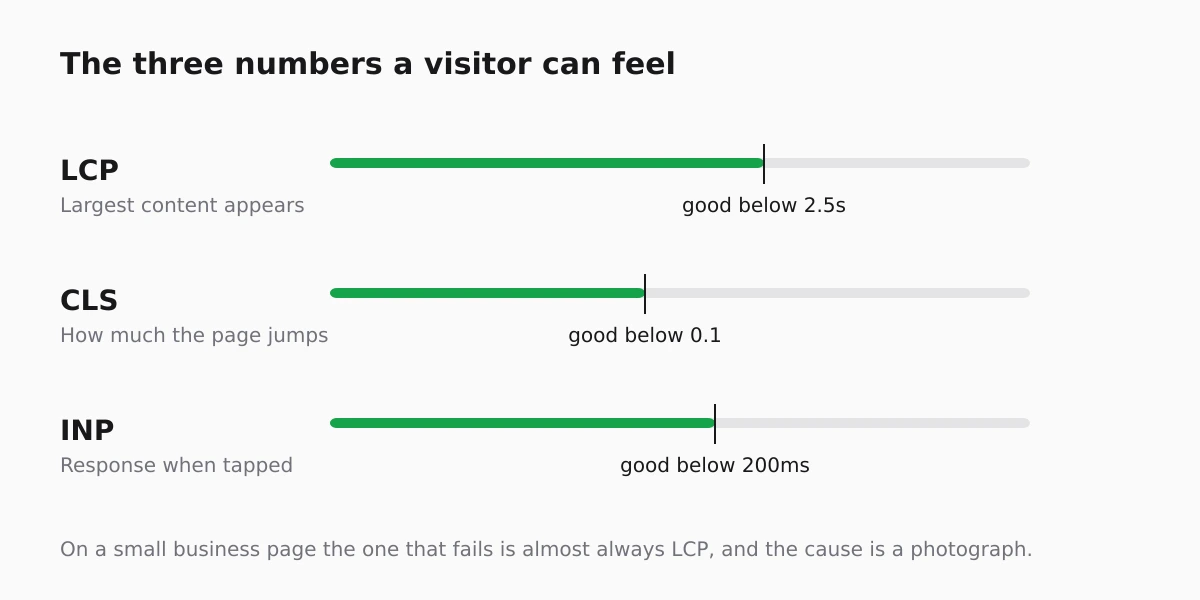
For a typical small business page, LCP is the one that fails, and the thing failing it is a photograph.
Images are the whole problem, usually
A photograph straight from a phone is several megabytes. Twenty of them on a gallery page is a page nobody on mobile data will wait for.
Two habits fix it: resize before uploading rather than letting the browser scale a huge file down, and prefer modern formats. The practical limits are in upload limits, and the reasoning behind sizing is the same as in image optimisation.
Third-party scripts are the second problem
Every analytics tag, chat widget, pixel and embedded map is a request to somebody else's server, and your page waits for it. Three of them is normal; nine is a page that is slow for reasons entirely outside your site.
Audit them once a year and remove the ones nobody looks at. The chat widget installed for a campaign two years ago is costing you every visit since.
Stop the page jumping
Layout shift comes from content arriving late without space reserved for it: images without dimensions, banners inserted at the top, fonts swapping after text has painted.
It is the cheapest of the three to fix and the most annoying to visitors, because it makes people tap the wrong thing.
Check it the way a visitor experiences it
Test on a phone, on mobile data, from a cold cache, not on the office wifi with everything already cached, and check the same pages a customer would reach from search. That is the version of your site most first-time customers meet.
The site health score gives a ranked list of what to fix rather than a wall of metrics, which is usually the more useful starting point for an owner.
Know when it is fast enough
A small business site that loads in about two seconds on a phone is not the reason it is not getting enquiries. Once you are there, the next improvement is almost always in what the page says rather than how quickly it says it.
FAQ
Does speed affect rankings?
It is one signal among many and it matters most when two pages are otherwise comparable. Its bigger effect is on whether visitors stay, which affects everything downstream.
How fast is fast enough for a small site?
Around two seconds to the main content on a mobile connection. Chasing a perfect score past that point rarely changes the business outcome.
Are page speed scores the same as real speed?
No. Lab scores simulate one device on one connection; field data reflects your actual visitors. Where they disagree, trust the field data.
Will removing analytics make my site fast?
It will help if you have several tags. Keep the one you actually read and remove the rest.
Does the number of pages slow a site down?
No. Page weight and third-party requests slow pages down; the size of the site does not.