
Search engines and AI assistants read your pages twice. Once as text, the way a person does, and once as data, looking for machine-readable facts: this is a product, it costs this much, it is in stock, these are the questions this page answers.
That second pass is structured data. It does not change your ranking directly, and anyone who tells you otherwise is selling something. What it does is make you eligible for the richer result formats, and give an assistant something unambiguous to quote.
What it looks like in practice
Structured data is a block of JSON in the page source, in a format called JSON-LD. Nobody sees it. It describes what the visible content already says, in a vocabulary from schema.org that machines agree on.
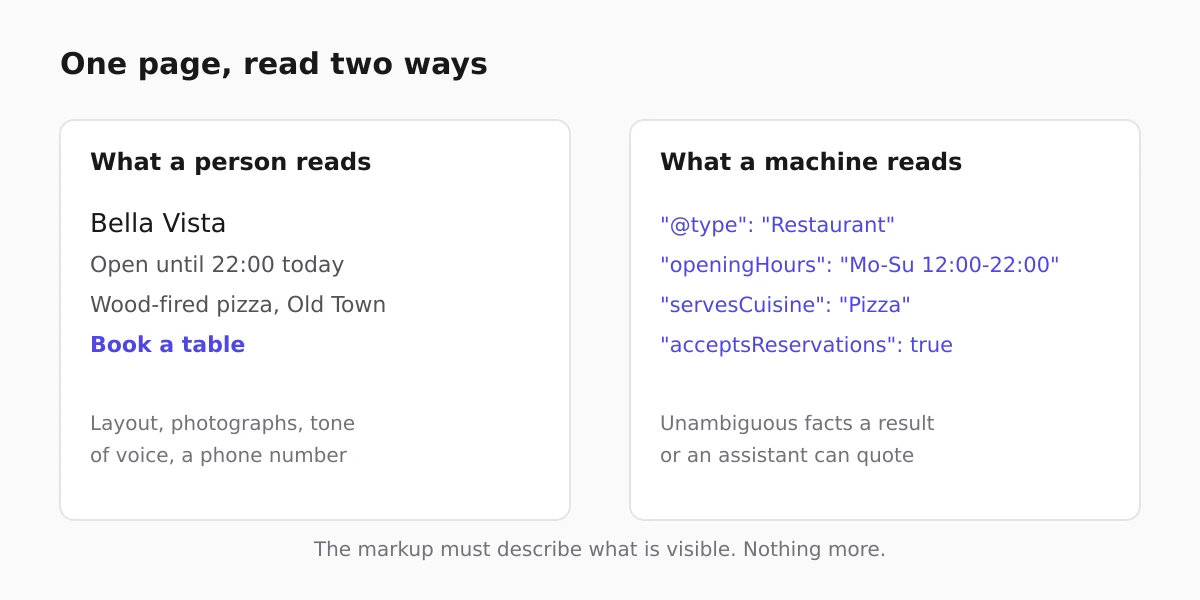
The important rule is that it must describe what is actually on the page. Marking up a price you do not show, or reviews you do not display, is the fastest route to a manual penalty.
The types worth having on a small site
- Product, for anything you sell: price, availability, currency. This is what puts a price under a search result.
- BreadcrumbList, so the result shows a path rather than a bare URL.
- FAQPage, where a page genuinely answers repeated questions.
- LocalBusiness, for a business with an address and opening hours.
- Article, on posts, so the headline, author and date are unambiguous.
That is the whole list for most small businesses. The rest of schema.org is vast and almost none of it earns its place on a five-page site.
What you get without doing anything
On a site built here, shop product pages already emit Product and BreadcrumbList markup from the product data you entered, so a price and a path can appear in a result without you writing any JSON. Products and their fields are set up as described in adding products.
The business-level markup is generated too, from your business details rather than from your page text: on a published site the homepage carries a LocalBusiness node, typed from the kind of business you selected, with your postal address and opening hours inside it, alongside site-level WebSite markup and breadcrumbs. Filling in those details properly is what makes it accurate, which is why it is worth ten minutes in business details.
Get the plain facts right first
Structured data amplifies what is already on the page. If your hours are wrong, marking them up publishes the wrong hours in a richer format.
So the order is: correct address, hours and phone number as text on the page, consistent with your business profile, and only then think about markup. The reasoning is the same one in local SEO for a medical practice, which applies to any business with a door.
Where the FAQ block earns its place
An FAQ section is the one piece of structured data most small sites can add honestly, because most businesses genuinely answer the same handful of questions every week. Write the questions as customers ask them, answer each in two or three sentences, and the page becomes eligible for the expanded result.
It also happens to be the format assistants quote most readily, which matters more each year. Practices are a good example: the questions a clinic answers every week are the same ones patients search, which is why the medical templates put them on the page rather than in a leaflet.
FAQ
Does structured data improve rankings?
Not directly. It makes a page eligible for richer result formats and gives assistants cleaner facts to quote, which can improve how often a result gets clicked, but it is not a ranking factor in itself.
Do I need to write JSON by hand?
For products and breadcrumbs on a site built here, no: those are generated from the data you already entered. For business-level or FAQ markup you either add it to the page or use a tool that does.
What happens if the markup does not match the page?
It is treated as misleading and can cost you the rich result entirely, sometimes with a manual action. Only mark up what a visitor can see.
Is LocalBusiness markup worth adding manually?
For a business people travel to, yes. It is the type most closely tied to appearing correctly in local results, and it is the one small sites most often lack.
How do I check it works?
Use a rich-results testing tool on the live URL rather than trusting the source. It tells you which types were detected and which fields are missing.