
Ask a small business how many customers it has and watch what happens. Somebody opens the orders screen. Somebody else says the newsletter list is bigger than that. A third person mentions the spreadsheet from the trade show. None of the three numbers match, and nobody can say which is right.
This is not a reporting problem. It is the reason the same person gets a "we miss you" email a week after spending 300 pounds with you.
What the split actually costs
- You email the wrong people. A win-back campaign that includes last week's customers reads as though you are not paying attention, because you are not.
- You cannot see value. A customer who books twice a year and orders occasionally looks small in both systems and is one of your best.
- Nobody knows who is new. Without a first-seen date across everything, "new customers this month" is a guess.
- The same person exists three times. With three spellings, two email addresses and a phone number attached to only one of them.
- Data requests become archaeology. Somebody asks what you hold about them and you have to check four places and hope.
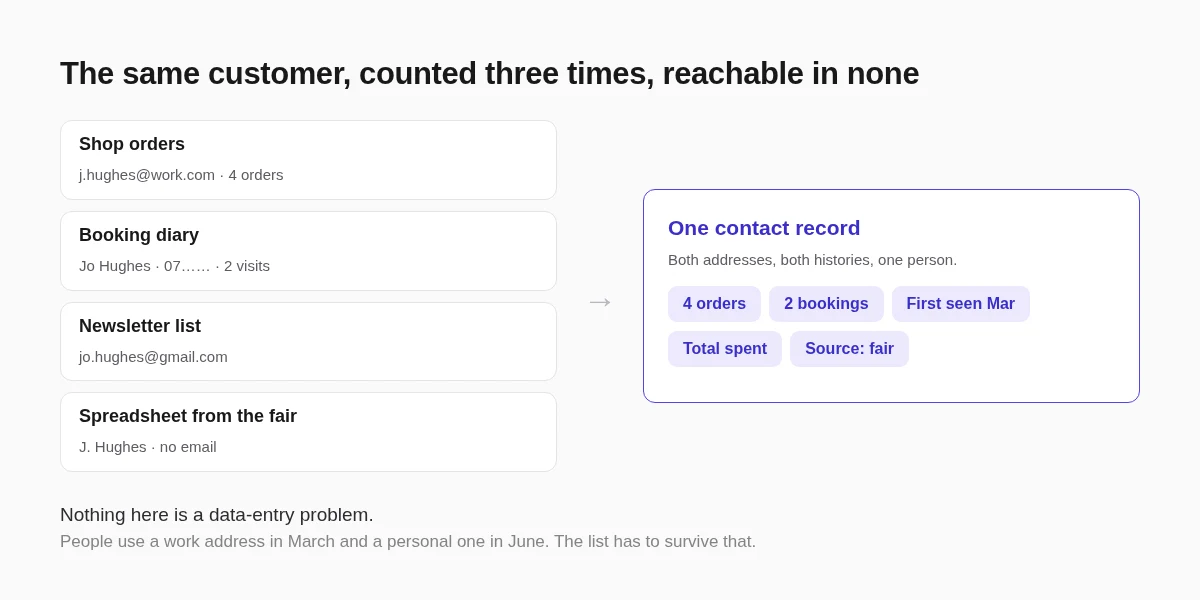
One record per person, everything attached
The fix is not a bigger spreadsheet. It is that every part of the site writes to the same contact record: a shop order, a booking, a contact form, a newsletter signup, a property enquiry.
On a site built here that record already carries the things you would otherwise reconstruct by hand: where the contact came from, how many orders they have placed, what they have spent in total, when they were first seen and when they were last seen. Nothing is typed twice, because the order that created the record also updated the totals.
Tags are the part people get wrong
Given a tagging feature, most businesses produce forty tags in a month and stop using all of them.
Tags earn their place when they describe something you would act on differently, and nothing else. "Wholesale", "cat owner", "prefers Saturdays", "came from the school fair" are all actionable. "Nice", "maybe", "2024" are not.
A workable rule: before adding a tag, name the email you would send to that tag and nobody else. If you cannot, it is a note rather than a tag, and the record has a field for notes.
Merge the duplicates rather than living with them
Duplicates are not a failure of discipline, they are what happens when a person orders with a work address in March and books with a personal one in June. You cannot prevent it and you should not try.
What matters is that merging two records keeps both histories rather than picking one, so the merged contact still shows both orders and both bookings. Contacts, segments and merging covers how that works in practice.
What a single list makes possible
Once it exists, several things that were previously guesswork become a filter.
- Customers who bought once and never came back, which is the only win-back list worth sending.
- Everyone who booked in the last ninety days, for the message that only makes sense to recent customers.
- Contacts from one source, so you can tell whether the trade show was worth the stand.
- Your actual best customers by total spend, which is almost never the list you would have written from memory.
Those are segments, and they are what makes email marketing feel like a conversation rather than a broadcast. If the sending side is new to you, email marketing for beginners is the place to start, and growing your list covers where new contacts come from.
The migration you have been avoiding
Bringing four lists together is a half-day job, once.
- Export everything you have, including the spreadsheet nobody trusts.
- Decide which system is authoritative for each field. Usually the shop for spend, the booking diary for dates, the newsletter tool for consent.
- Import, then merge duplicates rather than deleting them.
- Check consent carefully: somebody who bought from you has not necessarily agreed to marketing, and the two must not be conflated.
That last point is worth more than the rest combined. A single list makes it very easy to email everybody, and a single list of people who never asked to hear from you is a deliverability problem waiting to happen, which is its own subject.
FAQ
Is a contact list the same as a CRM?
For a small business, close enough. A full CRM adds pipelines, deals and forecasting, which most businesses under a dozen staff never use. What matters is that every customer interaction lands on one record, which is the part that actually changes decisions.
Should newsletter subscribers and customers be in the same list?
In the same list, with different consent. Keeping them apart is what causes the same person to exist twice, but marketing consent has to stay attached to the record rather than assumed from a purchase.
How many tags should a small business have?
Usually fewer than ten. The test is whether you would send a different message to that tag than to everyone else. If not, it is a note, not a tag.
What happens to the history when I merge two contacts?
A merge should keep both sides: both sets of orders, bookings and enquiries end up on the surviving record. If a tool asks you to choose which history to keep, that is a sign it is not really merging.
Where this goes next
The single-record arrangement and what feeds it is described in unified contacts, and the merging and segmenting side in contacts, segments and merging.
Once one list exists, the natural next step is asking your best customers for reviews, because now you can tell who they are.