One customer list for your whole business
Built from the orders, bookings and enquiries your site already takes - not typed in afterwards.
- Free forever to build the site itself
- Cancel anytime
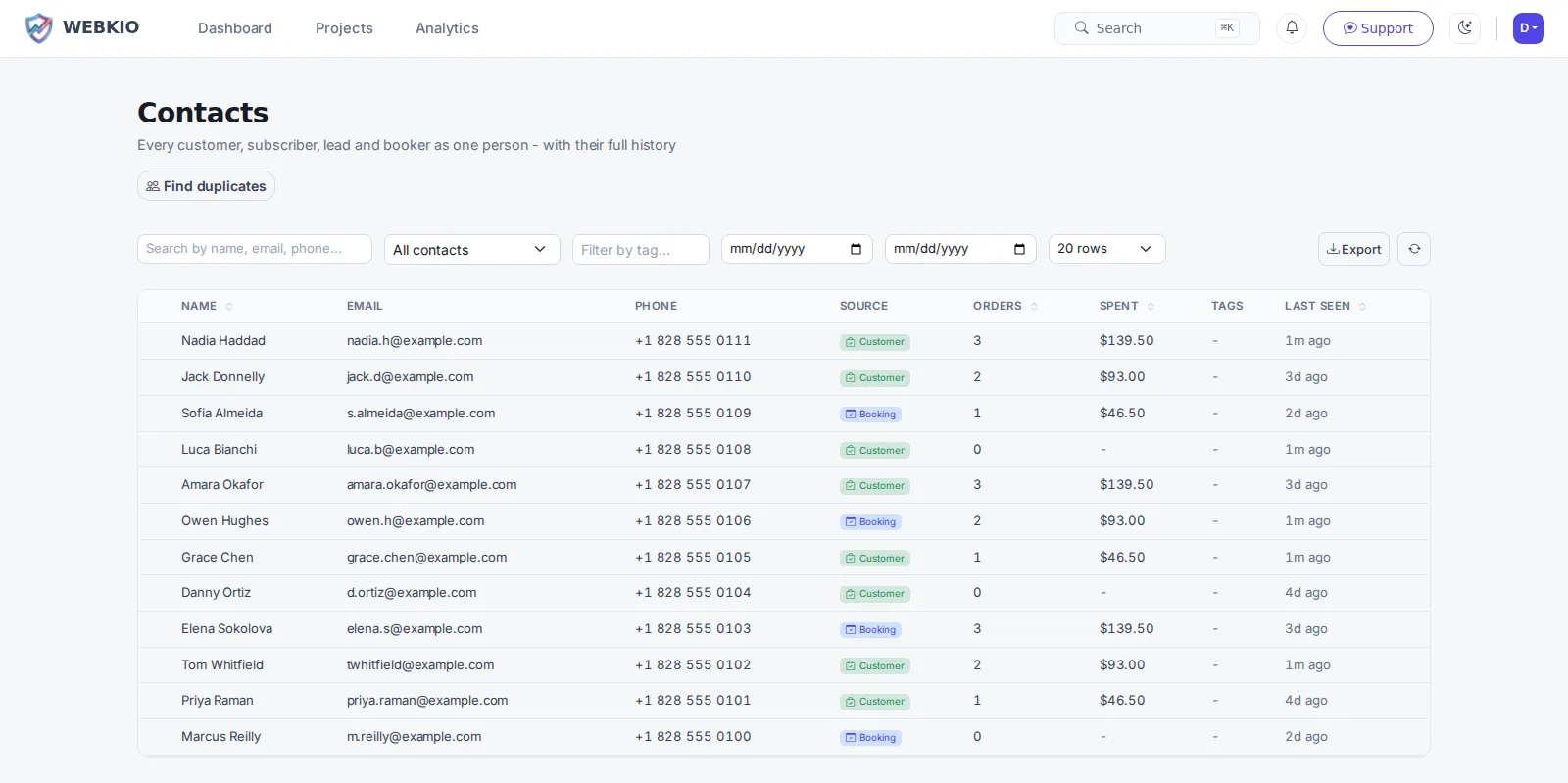
Most small businesses have their customers in four places: the till, the inbox, the booking diary and a notebook. Nobody merges them, so nobody knows who the regulars are. A customer list that assembles itself from the site is different in kind from a CRM you have to feed: somebody orders, books or sends a message, and they are on it, with what they spent and when they were last seen already attached.
Building your site, pages and blog are free forever. One customer list for your whole business is not - it needs Growth Business ($39.99/mo). Contacts is on Growth Business and up. It is the one feature here that genuinely needs the bigger plan, so it is worth knowing before you start.
It builds itself
Orders, bookings and contact-form enquiries all land in the same list. There is no import step and no evening spent merging spreadsheets.
What each person is worth
Number of orders and total spent sit on the contact, so your regulars are visible instead of being a feeling you have.
First seen, last seen
When somebody arrived and when they were last around - which is how you spot a good customer who has quietly stopped coming.
Tags and notes
Mark the trade customers, the awkward job, the one who only ever books Tuesdays. Your own shorthand, searchable.
Duplicates merged properly
The same person books with one email and orders with another. Merging keeps both histories on one contact rather than picking a winner.
Straight into a campaign
The list is the same one email marketing sends to, so a segment of your best customers is a filter rather than an export.
How it works
Live in an afternoon - no code, no plugins.
Take an order or a booking
The contact is created from it, with the amount attached. Nothing to set up.
Tag as you go
A note or a tag when something is worth remembering beats a tidy system you abandon.
Use it
Write to the regulars, ask the happy ones for a review, chase the ones who have gone quiet.
Frequently asked questions
More on customer list
Practical guides from the Webkio blog.
Explore other solutions
Ready to build it?
Build and publish your site for free, with no card. One customer list for your whole business needs Growth Business, and you can cancel any time.
Start freeAlready have a website? Import it free and see it as a Webkio site, and your pages keep the addresses they already have.