Drag and drop

Drag and drop website builder

Click the thing you want to change, and change it.

Autumn special offer 3 months free on any plan below, then the normal price. Ends 31 October. Start with the offer - it is applied automatically.
  • Free plan - no time limit
  • No credit card required
  • Cancel anytime
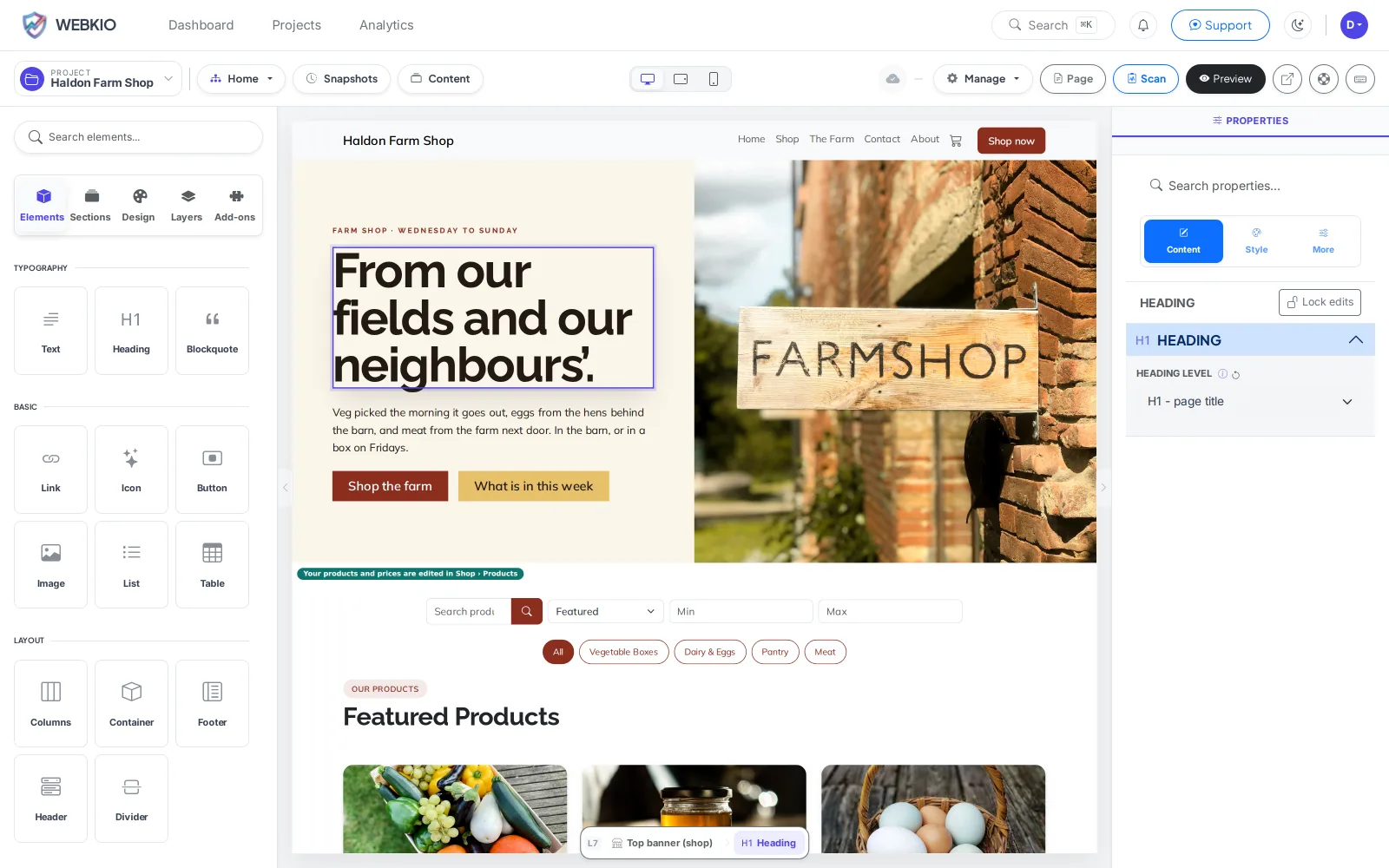
The Webkio editor with a heading selected and its properties panel open

Clicking a heading opens its properties beside the page. Switching to the phone view keeps you on the same canvas.

Most people who say they want "drag and drop" mean something simpler than it sounds: they want to look at their own website, see the sentence that is wrong, click it, and fix it. Not open a dashboard, find the right field, save, then go and check. That is what this is. Sections come from a library so you are never staring at an empty page, and everything you move snaps to a layout that was already designed to hold it.

What it replaces

  • An email to whoever built the site
  • Three days before a price change goes live
  • A small invoice for a small edit
  • A staging link you are asked to approve
  • A CMS login nobody wrote down
  • The version of the site that is six months out of date

Edit where you look

What you are looking at is the live page. There is no preview step because there is nothing to preview.

Sections, not a blank page

Pick a hero, a price list, an opening-hours block. They arrive already wearing your fonts and colours.

Move things without breaking them

Drag a section up and the ones around it shuffle down to make room. You can make the page ugly if you want to. You cannot make it structurally broken, which is the part that used to need somebody technical to undo.

A way back

Every save keeps the one before it. Spend an afternoon experimenting and you can still get Tuesday back. From Starter.

The phone layout is not an afterthought

Switch to the phone view and carry on editing. Same page, same words, different spacing.

Hand it to somebody else

Whoever changes the Christmas hours clicks the hours and types.

How it works

Live in an afternoon - no code, no plugins.

1

Start from a template

Pick one that is already the right shape for your trade, with its pages written.

2

Change what is wrong

Your name, your photos, your prices. Click and type.

3

Publish

It is live on a free address with HTTPS, or on your own domain from Starter.

Templates to start from

Hand-picked designs for this kind of business - customise any of them.

Frequently asked questions

You can make it ugly - that is your prerogative - but you cannot leave it structurally broken. Sections keep their own spacing rules and the page recovers when you move things around. And every save keeps the previous version from Starter, so an experiment is reversible.

Yes, the whole editor is. There is no reduced version. The free plan limits what the SITE can do - no shop, no diary, no custom domain - not how you build it.

Custom CSS and embeds are there from Starter. They exist for the exception; if you find yourself in there every week, something is wrong with the template you started from rather than with you.

No. Templates come as finished sites with real pages and real copy for a trade like yours. Most owners change the words and the photos and never touch a colour.

An afternoon is normal for a site somebody actually looks at. Publishing itself takes seconds.

Ready to build it?

Start free, no credit card. Upgrade only when you're ready to take payments.

Start free

Already have a website? Import it free and see it as a Webkio site, and your pages keep the addresses they already have.