
Content collections

Content collections

Define it once. Add a hundred. They all look right.

Autumn special offer 3 months free on any plan below, then the normal price. Ends 31 October. Start with the offer - it is applied automatically.

Open a live site

  • 14-day free trial - card required
  • Free forever to build the site itself
  • Cancel anytime
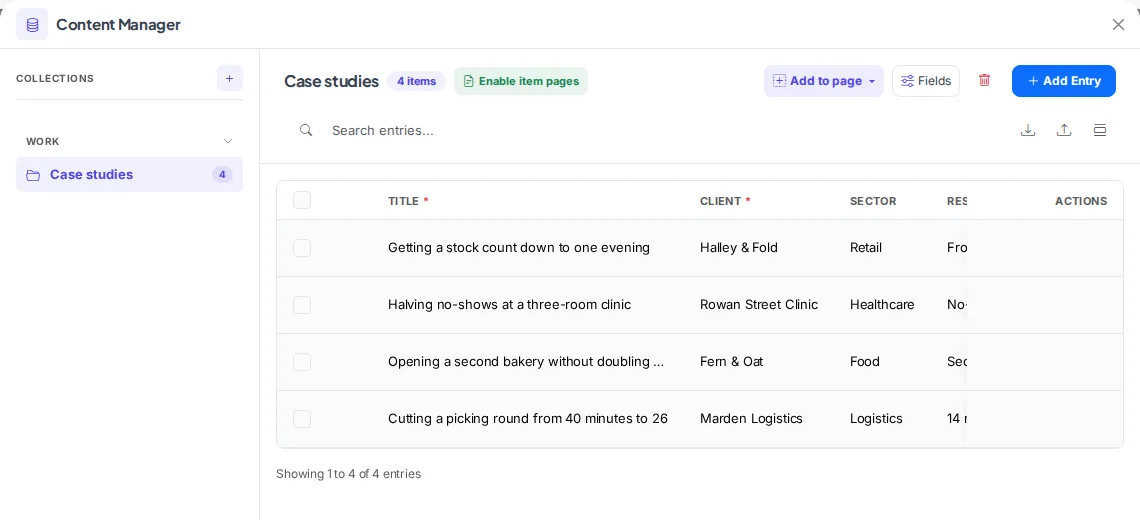
The Content Manager showing a Case studies collection with four entries and columns for title, client, sector and result

The Content button in the builder toolbar opens the manager. Picking a collection shows its entries.

How it works

Four screens, in the order you would meet them.

Step 1

Open Content from the builder toolbar

It is not in the dashboard. Open your site in the builder and the Content button sits in the top bar, next to Snapshots.

The builder top bar showing the Snapshots and Content buttons
Step 2

Add a collection and fill it

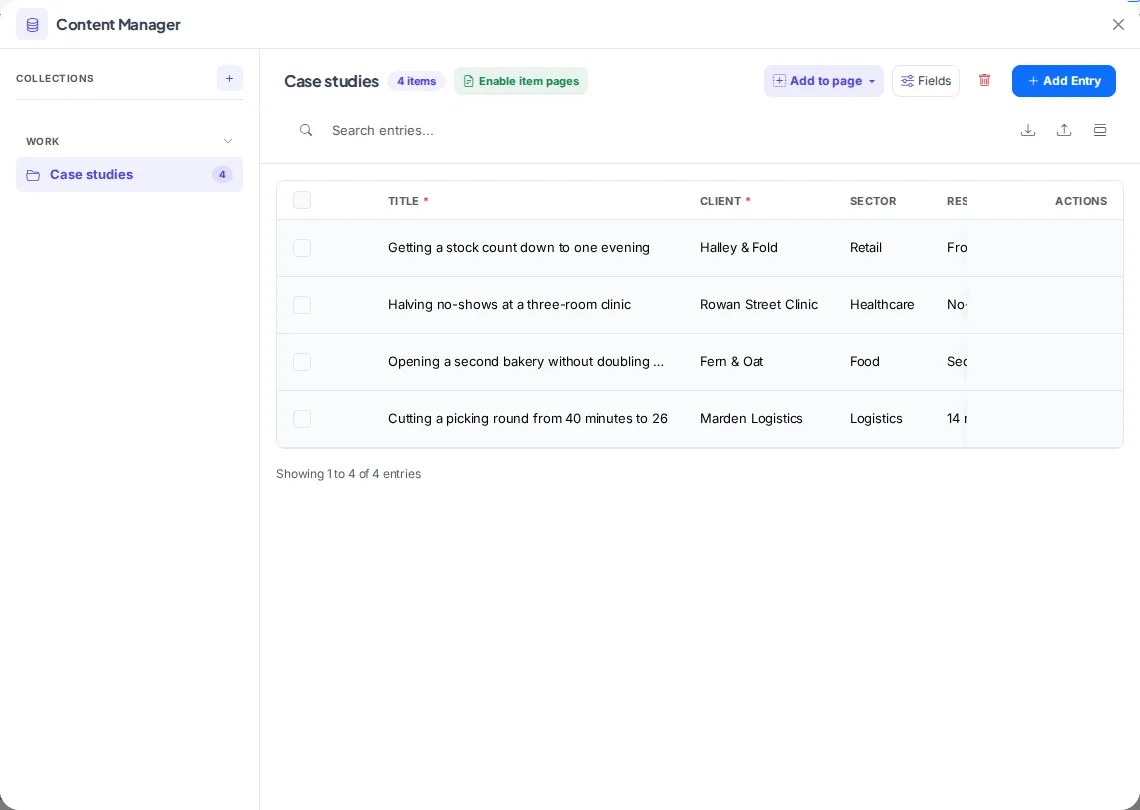
Name it after the thing you have a lot of. Entries appear in a table you can search, reorder and export.

The Content Manager showing a Case studies collection with four entries
Step 3

Decide what every entry carries

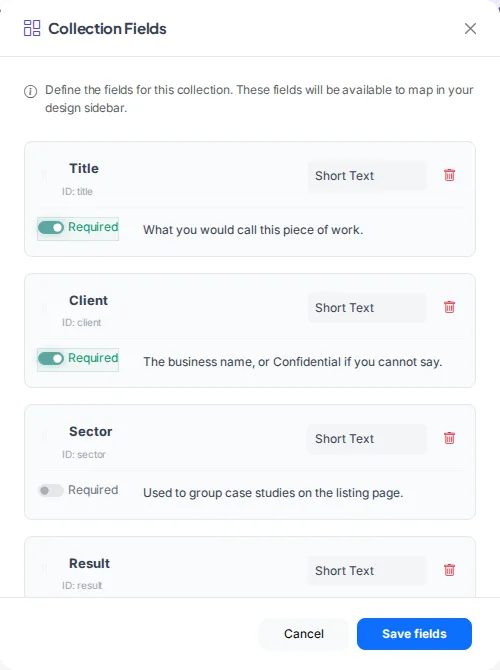
Each field has a type, and you choose which are required. The help text is what the person adding next month's entry will read.

The Collection Fields editor showing typed fields with required toggles and help text

There is a kind of content a blog cannot hold properly. A list of case studies where each one has a client, a sector, a result and a photo. A team page where everybody has a role and a bio. A menu where every dish has allergens. You can build those by hand, and plenty of people do, right up until the twelfth one and the afternoon they change the layout. A collection is the version where you describe the shape once.

Building your site, pages and blog are free forever. Content collections is not - it needs Starter ($14.99/mo). The 14-day free trial covers it, and starting the trial needs a card. Collections start on Starter. The blog is on every plan including free, so if posts are all you need you already have it.

Before you start the trial

  • Nothing is charged today. Cancel any time before day 15 and you are not charged at all - the account moves to the Free plan and your site and its data stay.
  • Taking payment runs through your own Stripe account. Connecting it is a separate identity check with Stripe that can take a few days, so start it on day one if you want to take a real payment inside the trial.
  • The trial runs on Starter only. Moving up a plan part-way through ends the trial and starts the paid subscription, so if you already know you need the bigger tier, start there instead.
  • One trial per account.

What it replaces

  • A page per case study, laid out by hand
  • Forty pages that are almost the same page
  • A spreadsheet somebody keeps in sync with the site
  • The team page that still lists the person who left
  • Rebuilding the layout when you change one field

Describe the shape once

A case study has a client, a sector, a result, a photo. Say that once and every case study has those fields waiting.

Fields with types

Text, rich text, images. Whoever fills it in gets the right box.

Things that point at other things

A case study can reference the team member who ran it. Change her job title in one place and it is right in both.

The detail page builds itself

You lay out one item. The forty-first gets its own page, its own address and its own place in the sitemap without you opening the editor.

Every item keeps its history

Somebody rewrote the bio and it was better before. The old one is still there.

Safe to hand over

Required fields and help text mean the person adding next month's case study cannot leave the result blank or put the photo in the wrong place.

How it works

Live in an afternoon - no code, no plugins.

1

Name the collection

Case studies, team, menu, properties. Whatever you have a lot of.

2

Add the fields

The handful of things every one of them has.

3

Lay out one

The rest follow it, including their own pages.

Templates to start from

Hand-picked designs for this kind of business - customise any of them.

Frequently asked questions

A blog post is a title, a date and a body, and that is the right shape for writing. A collection is for things with a shape of their own - a case study with a client and a sector, a dish with allergens. If what you have is articles, use the blog; it is on every plan including free.

No. You design the detail layout once and every item gets its own page and its own address from it. That is the whole point - the fortieth item costs you a form, not an afternoon.

Yes. A field can point at another collection, so a case study can reference the person who ran it and you only maintain that person once.

You can add fields as you go. Existing items simply have that field empty until somebody fills it, which is usually what you want when a collection grows into something you did not plan.

Starter and up. The blog, which covers most people, is on every plan including free.

Ready to build it?

Build and publish your site for free, with no card. Content collections needs Starter, free for 14 days on the trial, and you can cancel any time.

Already have a website? Import it free and see it as a Webkio site, and your pages keep the addresses they already have.