 Creative & Portfolio
Interior Designer
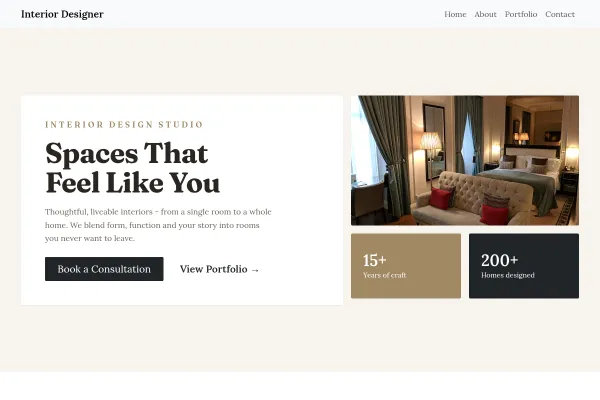
Interior design studio: finished rooms as magazine spreads with spec lines, three fixed-fee bands, a home visit as the ask.
4 pages
View template
A personal portfolio for designers, developers, writers and freelancers - the digital CV that ranks for your name. Work first, a human about-section second, contact everywhere.
Choose six projects that represent the work you WANT more of, write each case as problem-approach-result, and say in the hero what you do and your availability. Your name in the title tag is the SEO that matters here.
Every freelancer is searched for by name at some point: by a recruiter, a prospective client, somebody who was given a recommendation. This is the page that should be the first result, not a social profile you do not control.
Open with the work. A visitor who scrolls past three paragraphs of positioning before seeing anything you made has already formed an opinion, and it is not the one you wanted.
Freelance, contract, full time, the kinds of project you want more of. Portfolios that show excellent work and never state availability generate admiration rather than enquiries.
Roles, dates, tools, clients. Recruiters skim for these and some will never open a case study, so the facts need to exist as text on the page.
Connect your own domain rather than relying on a platform subdomain, which is covered in connect a custom domain. The full approach is in how to make a portfolio website.
Yes - you can start building with the Creative Portfolio template for free. Paid plans unlock more projects, custom domains, and additional features.
It comes with 4 ready-made pages: Home, About, Services, Contact.
It is set up for Services, Gallery. Those are built in rather than add-ons, so they work from the moment the site is created.
Manrope for headings and Inter for body text, on a palette built around #4f46e5 and #111827.
No. The Creative Portfolio template is edited visually in the drag-and-drop builder - no coding at any point.
Creative & Portfolio
Interior design studio: finished rooms as magazine spreads with spec lines, three fixed-fee bands, a home visit as the ask.
 Creative & Portfolio
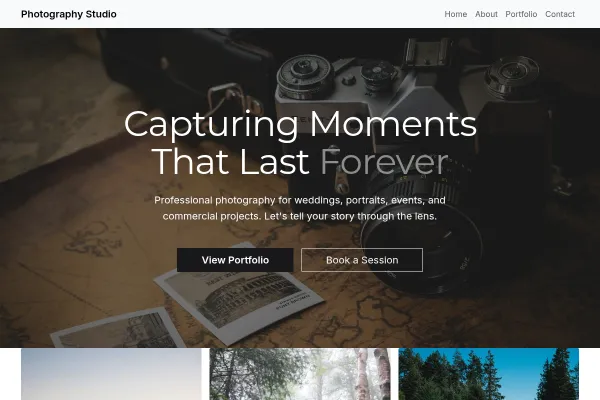
A photographer's site in the dark: a full-bleed portrait, an edge-to-edge mosaic, every frame numbered like a contact sheet, three packages priced, a date check as the ask.
 Creative & Portfolio
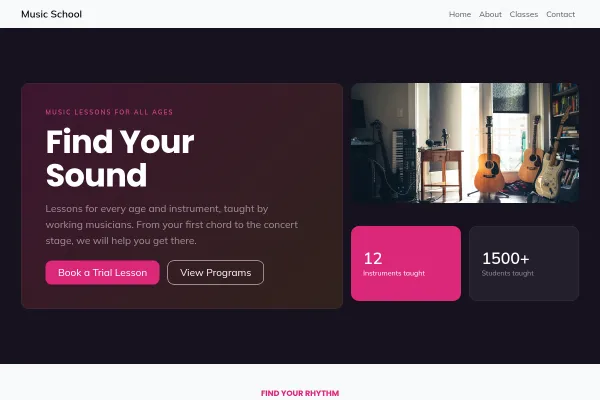
Music school: an instrument index with ages and prices, a teachers-who-still-play story, a free trial lesson as the ask.