Add Google Analytics to your business website
Paste your own GA4 or Tag Manager snippet into the site head. It is your tag, your property, your data.
Built in - paste your measurement ID, nothing else
How it actually works
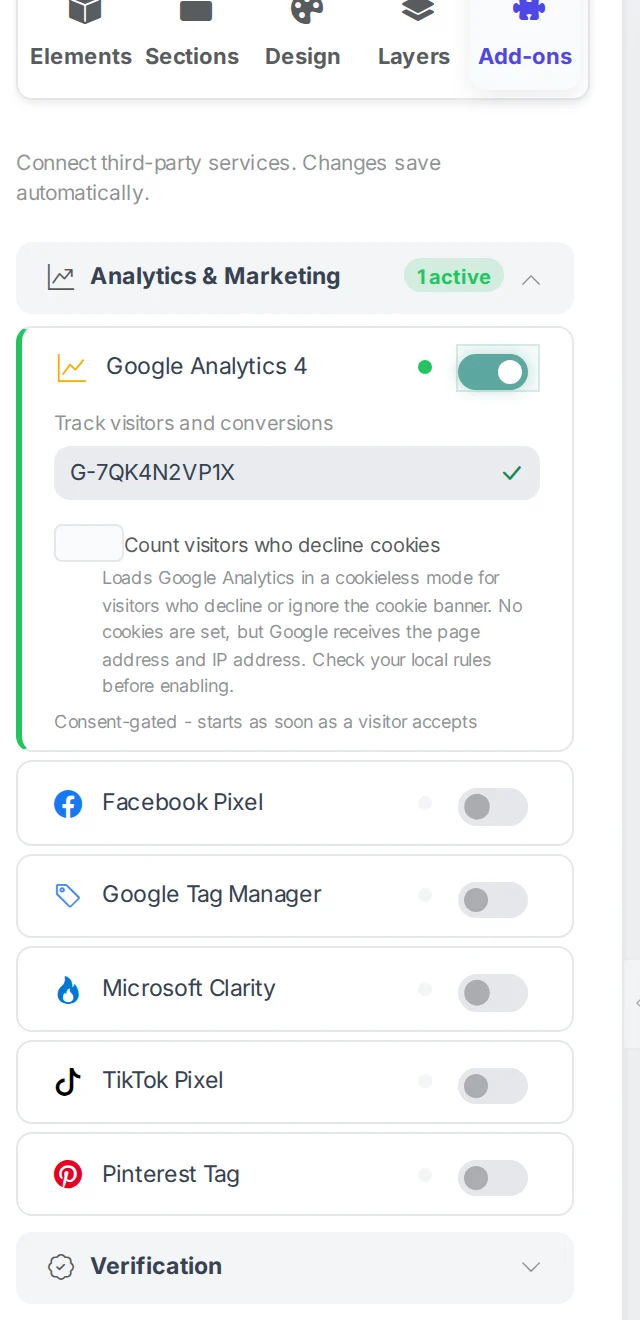
Google Analytics 4 is one of the integrations in the builder, so there is no snippet to paste and no code to maintain. You give Webkio your measurement ID - the G- code from your GA4 property - and the tag is written into every published page for you. The property stays yours, the data goes to your account, and nothing routes through us.
Setting it up
- In Google Analytics, create a GA4 property and copy its measurement ID. It starts with G- and the rest is letters and numbers.
- Open your site in the Webkio builder and choose Add-ons, the last tab in the left sidebar.
- Find Google Analytics 4 under Analytics and Marketing, paste the measurement ID, and save.
- Publish, then check Realtime in Google Analytics with your own site open in another tab.
What the cookie banner does to it
- Consent comes first
- The tag waits for the banner. Nothing loads for a visitor until they accept, and if they accept halfway down the page it starts measuring from there rather than waiting for the next page.
- Visitors who decline
- There is a switch under the measurement ID: Count visitors who decline cookies. It runs Google Consent Mode v2, so Google still receives the page address and the IP, and sets no cookies. It is off until you turn it on, because whether that is allowed is a local question and your answer may differ from ours.
- Your own analytics is unaffected
- The built-in counter is server-side, so it carries on either way. That is why its numbers will be higher than GA4's, and why neither is wrong.
When it does not work
- Realtime shows nothing
- Two usual causes, in order: the site has not been published since you saved the ID, or your own ad blocker is blocking the tag. Try a phone on mobile data before assuming anything is wrong with the setup.
- GA4 or Tag Manager - which one
- Both are in the same list and either works. Use Google Analytics 4 if analytics is all you want. Use Google Tag Manager if you expect to add more tags later, because then you add them in Google rather than coming back here each time.
- Numbers do not match the built-in analytics
- They will not, and neither is broken. Google Analytics drops visitors who block it or refuse consent; the built-in counter is server-side and sees more of them. Expect the GA number to be lower.
Worth knowing first
Every Webkio site already has built-in analytics on every plan, including the free one, so you may not need this at all. Add GA when you need something the built-in reports do not show, or when somebody else needs access to the data.
Build the site first
Every integration here attaches to a site you have already made. Start from a template for your trade and connect things once it is live.