Get website inquiries in a Slack channel
The inquiry shows up where the people on shift are already looking, seconds after the visitor presses send.
Built in - one incoming webhook URL from Slack
The inbox, a channel, or a CRM: which one fits
- The Inbox and its email, and nothing else
- Every inquiry is already kept in your Webkio Inbox, and a notification email goes out for each. If one person answers everything and checks email through the day, that's enough, and adding a channel only gives the same message a second place to be ignored.
- A Slack channel
- Right when more than one person could answer and whoever is free should. Everyone sees the same message at once. What a channel doesn't have is an owner, a status or a reminder, and for a team of three that is fine, because everyone sees everything.
- A CRM, or a card on a board
- Right once inquiries arrive faster than they are answered. A channel is then where they go to scroll away, and you want a destination that keeps each one as a record with somebody's name on it.
- Two of them together
- The choices aren't exclusive. One inquiry can post to Slack and be filed in a CRM as well, each as its own destination with its own selection of inquiries.
What the Slack option is
This isn't a CRM connection, and for most small teams it is the better choice. Webkio posts each inquiry into a Slack channel as a short, readable message: who wrote, what they said, how to reach them and which page they were on. There's no shared mailbox to own or remember to check. Whoever is free replies to the customer and marks the message with a tick so the others know it's handled.
The message in the channel
A dental practice points its site at a channel called front-desk. At 7:40 on a Monday morning this arrives:
- Headline, in bold
- Website inquiry from Alicia Romero
- Her message
- "Chipped a front tooth last night. Do you have anything today or tomorrow? I am a new patient."
- Details
- Email: [protected], Phone: (216) 555-0171, Page: the address of the New Patients page
- Small print underneath
- The name of the site, so a practice with two locations and two sites can share one channel
The headline is the first line of the message, so whatever Slack shows of a new message starts with who is asking.
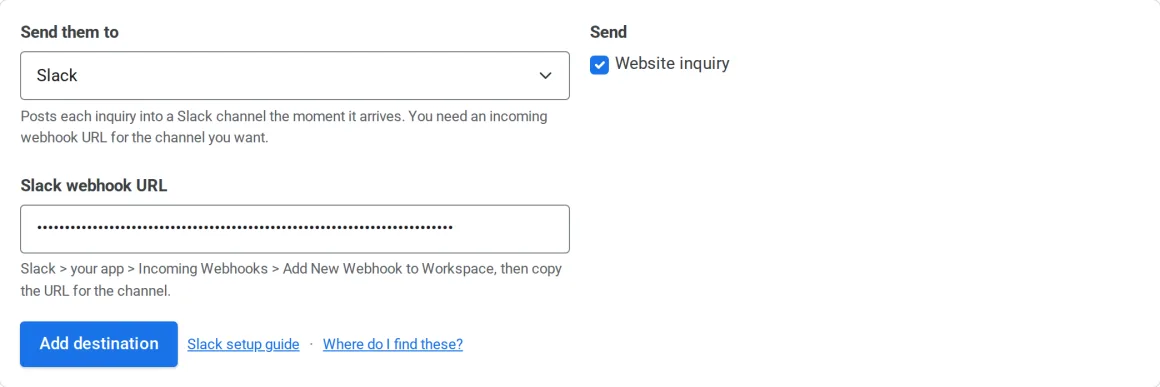
Getting a webhook URL and pasting it
- In Slack, create an app for your workspace, turn on Incoming Webhooks, and add a webhook for the channel you want. Slack gives you a long URL that starts https://hooks.slack.com/.
- Copy that URL and treat it like a password: anyone who has it can post into the channel.
- Webkio side: the site's settings menu has a Lead delivery (CRM) row, shown in full to the account owner.
- Choose Slack under Notifications, paste the URL and add the destination.
- Send a test and watch the channel. To move to another channel later, make a new webhook in Slack and add it as a new destination. A webhook posts to the channel it was created for.
Slack, Teams and custom webhook setup in the docs
Slack questions
- Can it mention a person or a group?
- The message doesn't include a mention, and its wording is fixed. If you want somebody paged, use Slack's own notification settings for that channel. It's a channel made for inquiries, so every message in it is one.
- Does it work with a private channel?
- Yes. A webhook is created for one specific channel, and to add one to a private channel you have to be a member of it. Messages then post there whoever triggers them, since it's the webhook doing the posting and no user is involved.
- Slack answered with an error. What now?
- Slack names the problem and we show its words on the destination card: channel_not_found means the channel no longer exists, channel_is_archived that it was archived, and no_active_hooks or no_service that the webhook itself was disabled or removed. Make a new webhook, add it, and remove the old destination.
- Will spam flood the channel?
- Messages scored as spam are never sent to any destination, so the channel sees what the Inbox treats as real. No filter catches everything, and when a junk message does get through it reaches Slack too, where at least it is quick to ignore.
Worth knowing first
Two plain facts. Posting inquiries to Slack is part of lead delivery, which is on the plans named under Which plans and is set up by the account owner. And we build the message to Slack's documented webhook format without a workspace of yours to try it in, so the test message is the moment of truth. It takes seconds.
Build the site first
Every integration here attaches to a site you have already made. Start from a template for your trade and connect things once it's live.