Add website inquiries to Pipedrive as people
Whoever writes to you through the site is in Pipedrive as a person, with a working email and phone, before you have finished reading the message.
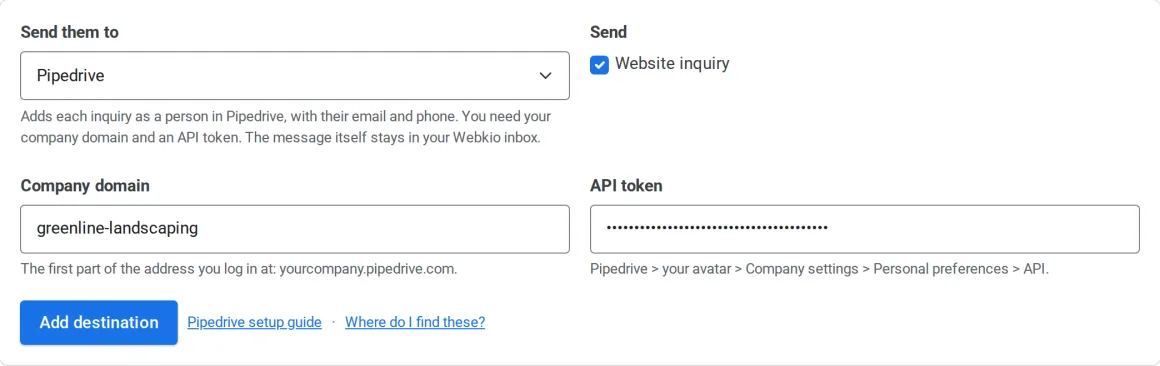
Built in - your company domain and an API token
What reaches Pipedrive, and what stays behind
For every inquiry, Webkio adds one person to your Pipedrive account with their name, email address and phone number. That's the whole of it, and the limit belongs up front: the message itself doesn't go to Pipedrive, and no deal or lead is opened. This connection sends those three fields and stops there: it doesn't attach the message as a note, and it doesn't make the second request that opening a deal would take. The words they wrote are in your Webkio Inbox, one click from the notification email.
What Pipedrive ends up with
Take a two-person bookkeeping practice. Marcus Oyelaran fills in the form on the Services page, asking about monthly books for his food truck. In Pipedrive, a new person appears:
- Name
- Marcus Oyelaran
- [protected], marked primary and labeled work
- Phone
- (503) 555-0164, marked primary and labeled work
- Not sent
- His message, the page he was on and the name of your site. Those are on the Inbox entry for the same inquiry.
Somebody who leaves no name is filed under their email address, so you never get a blank row. Here's the arithmetic that decides whether this is worth ten minutes of setup: at 15 inquiries a week and about 2 minutes to create a person by hand, 15 x 2 = 30 minutes a week, which is 26 hours a year of typing that stops. Those are example numbers. Put your own in.
Five steps to connect it
- In Pipedrive, click your account name, go to Company settings, then Personal preferences, and copy your API token from the API tab.
- Note your company domain: the subdomain in the address bar while you're signed in to Pipedrive.
- Sign in to Webkio as the account owner, pick the site, and choose Lead delivery (CRM) from its Site settings menu.
- Select Pipedrive, enter the domain and the token, tick the inquiries to send, and add the destination.
- Use Send test. Pipedrive answers with a plain success or a reason, and the card shows whichever it was.
Pipedrive setup, step by step, in the docs
What Pipedrive gets, and what stays here
- The person's name
- As they typed it. If somebody leaves the name blank, the person is named by their email address instead, so there's never an unnamed record.
- Email and phone
- Each one as the primary value, labeled work. A field the visitor didn't fill in is left off the record, so no empty value is sent.
- The message, the page and the site
- Not sent. A person in Pipedrive holds contact details, so what they asked, and which page they asked it from, stay in your Webkio Inbox. Open the inquiry there before you call.
- Two sites, one Pipedrive
- Add the destination on each site, with the same domain and token. Pipedrive won't show which site a person came from. If that matters for your follow-up, HubSpot or Airtable include the site name with every lead.
Think twice if you work from deals
If your process starts with a deal on a board, this will feel half done: you still open the person and add the deal yourself, with the message open in another tab. That's a click and a paste where there used to be a retyped contact, which may be all you need. If it isn't, look at what automation your Pipedrive plan offers for opening a deal when a person is added. That side of it belongs in Pipedrive.
Questions about the Pipedrive connection
- Why is the message not in Pipedrive?
- Because this connection creates a person from three fields, and a paragraph of free text isn't one of them. Sooner than squeeze a message into a name or a label, it's left where it can be read whole: the Inbox entry for that inquiry, which also has the page they wrote from.
- The same person wrote twice and now appears twice. Is that a fault?
- No. Each inquiry adds a person, and this connection doesn't look up existing ones first. Pipedrive has its own Merge duplicates tool for exactly this. It flags people who share a name and also an email address, a phone number or an organization, so two inquiries from one person under the same name will be offered to you for merging.
- Whose token should I use?
- Each Pipedrive user has a token of their own. Use the one belonging to whoever should be answerable for these people, then open the test person in Pipedrive and check the owner is who you expected. A token is a secret: it's encrypted when stored and never displayed back to you, so replacing it means pasting a new one.
- What happens if Pipedrive is down when an inquiry arrives?
- The visitor never waits on Pipedrive: the form finishes first and the copy goes out in the background. A send that fails is retried up to six times over about half an hour, and after that it stays under Recent deliveries with a Send again button.
Worth knowing first
This needs a plan with lead delivery, and it needs you: only the account owner can add a destination, because it holds a key to another service. We wrote it to Pipedrive's published API and haven't run it against a Pipedrive account of every size, so treat Send test as the real check.
Build the site first
Every integration here attaches to a site you have already made. Start from a template for your trade and connect things once it's live.