Add Microsoft Clarity heatmaps to your website
See where people click, how far they scroll and where they give up, on recordings of real visits to your own pages.
Built in - paste your Clarity project ID
What Clarity adds that counting doesn't
Counts can tell you that, say, 100 people opened your booking page and 12 booked. They can't tell you what the other 88 did. Clarity, which Microsoft offers at no charge, records visits as replays and draws heatmaps of clicks and scrolling. It's one of the named add-ons in the Webkio builder: paste the project ID from your Clarity account and the recorder is added to every published page. It counts as analytics on your cookie banner, so it runs only for visitors who accept analytics cookies.
A first session with it, and what it costs in time
A yoga studio sees plenty of visits to its class schedule and few sign-ups. A sensible first use looks like this:
- Filter
- Recordings that visited the schedule page
- Watch
- 20 recordings at roughly 2 minutes each: 20 x 2 = 40 minutes, once
- Write down
- Every place someone taps something that isn't a link, scrolls back up, or leaves
- Look for
- The same stumble in 3 or more of the 20. One confused visitor is noise; three is a pattern worth fixing
- Then
- Change one thing in the builder, publish, and compare the scroll heatmap a week or two later
Those numbers are a suggested way to spend one evening, and no research stands behind them. The point is to watch a fixed batch and stop, because recordings are easy to watch for hours while learning nothing new after the first twenty.
Switching it on
- Create a project in Clarity for your site address and copy its project ID. The field here takes a short string of letters and numbers.
- In the Webkio builder, open Add-ons, the last button on the left.
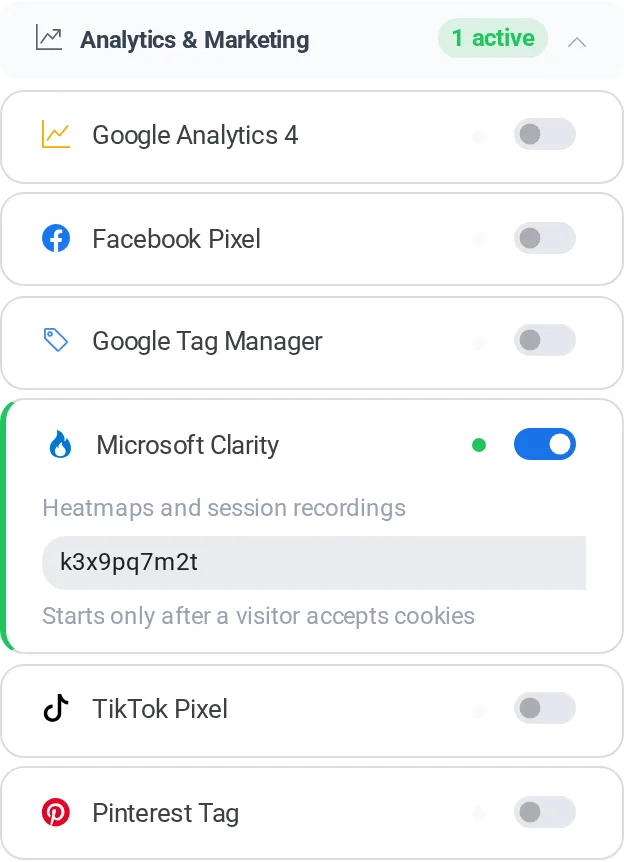
- Find Microsoft Clarity in the Analytics & Marketing group, switch it on and paste the ID.
- Publish. Then visit your live site in a private window, accept the cookie banner, and click around for a minute.
- Give it time before you judge. Microsoft says a newly added tag can take 30 minutes to 2 hours to register in a project. After that, look for your own visit in its dashboard.
Which recordings to filter for first
- A shop
- Recordings that visited /cart. The ones that also reached a page starting /order/ paid. The rest are the baskets left behind, and those are the ones worth watching.
- Appointments
- Recordings that visited your booking page. A paid booking comes back with booking_paid=1 in the address, so a session that never shows it either booked without paying online or gave up partway.
- Rentals
- Recordings on the page with the rental form. Watch the date picker and the extras: whether people change dates two or three times, or stop at the price, tells you which of the two to fix.
- A service business
- Recordings that visited your contact page. Sessions that scroll the form and leave without sending usually stall at the same field, and three people stopping at the same box is worth the change.
When not to record
Skip it, or think hard, if your site takes sensitive details: a clinic intake form, a counseling inquiry, anything a visitor would be uneasy to learn was replayed. Microsoft says Clarity masks the content of input boxes in every masking mode, and you should check the masking settings in your own project and not take our word for it. Your privacy policy also has to say that visits may be recorded. And if the site is five pages and a phone number, the built-in analytics already tells you most of what a replay would.
Clarity questions
- My own visit isn't showing up.
- Three usual reasons: the site wasn't published after the ID was saved, you declined or ignored the cookie banner, or a privacy extension in your browser blocked the recorder. Try once on a phone using mobile data, accept the banner, and wait a while before deciding it is broken.
- Why do Clarity's totals not match my other numbers?
- Clarity counts only the visits where analytics cookies were accepted and its recorder was allowed to load, and a privacy extension in the visitor's browser can block it. Treat what it shows as a sample to watch, and take your visit counts from Insights, which is built for counting.
- Is it legal to record visitors?
- That depends on where your visitors are, and the decision is yours to make. What the product does is hold the recorder back until a visitor accepts analytics cookies, and never start it for anyone who declines. Say in your privacy policy that visits may be recorded.
- Does it record me working on the site?
- No. The recorder is added to published pages only. The builder and your dashboard are separate from your public site and run no recorder, so your own editing is never sent to Clarity.
Worth knowing first
Two things before you start. The Add-ons panel belongs to the paid plans shown under Which plans. And a recording is of a real person: use it to fix pages, keep access to your Clarity project tight, and don't go looking for individual customers in it. If that sounds like more responsibility than the insight is worth for your site, it probably is.
Build the site first
Every integration here attaches to a site you have already made. Start from a template for your trade and connect things once it's live.