Gift cards
A gift card - also called a gift voucher - is credit someone buys for another person to spend in your shop.
Where to find it
Shop > Gift cards.
How it works
- A customer buys a gift card, or you issue one yourself.
- They get a code.
- The recipient enters that code at checkout and the balance comes off the total.
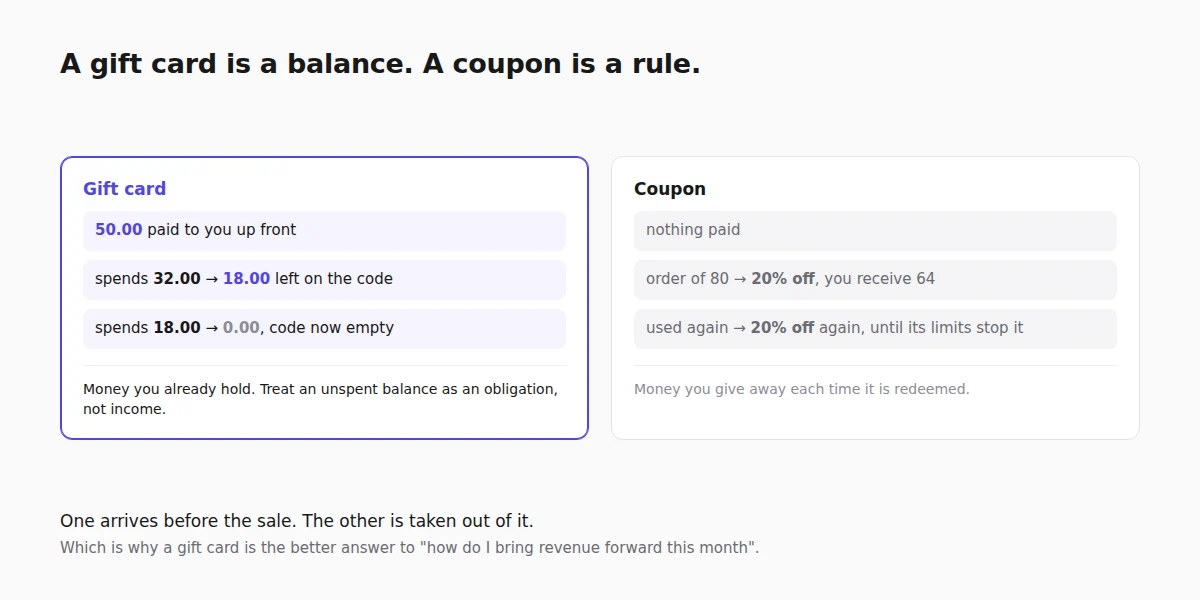
A gift card holds a balance, not a single-use discount: spend part of it and the rest stays on the card for next time. That is the difference from a coupon - a coupon is a rule you apply, a gift card is money already paid to you.
Issuing one yourself
Issue gift card creates a card without anybody buying it. It takes:
| Field | What it does |
|---|---|
| Amount | The starting balance. |
| Recipient email | Optional. Fill it in and the card is emailed to that address; leave it blank and the row shows Never sent, which is what you want when you are handing over a printed code in person. |
| Expires | Optional. Leave it empty for No expiry, which is the right default in the several places where expiring paid-for credit is restricted by law. |
| Note | Internal only. Worth using: "goodwill, order 1043" is what makes a card make sense to you in eight months. |
Useful as goodwill after a problem order, or for selling a voucher across the counter.
Generating a batch
Generate a batch of gift cards issues many at once: choose how many and the value each, and you get that many distinct codes in one go. Copy codes puts the whole set on your clipboard, which is how they reach a printer, a spreadsheet or a corporate customer buying forty at a time.
Batch cards behave exactly like single ones. They are separate codes with separate balances, not one code used many times - that is what a coupon is for.
The balance, and changing it
Each card shows its remaining Balance and its History: every purchase it was spent on, and every adjustment you made, with the reason attached.
Change adjusts a balance by hand, and asks for a reason for the balance change rather than letting you do it silently. Use it to correct a mistake, honour a card issued elsewhere, or top one up. The reason is the audit trail, and it is the difference between a records question you can answer and one you cannot.
Active and Inactive decide whether a code can be redeemed at all. Deactivate a card reported lost rather than deleting it, so its history survives.
Which plan includes it
Gift cards are available on Growth Business and above. On Free and Starter the Gift cards page shows an upgrade panel instead.
Cards you have already issued are never affected by a plan change. A gift card is money a customer has already paid you, so existing codes keep working at checkout even if you move down to a plan that cannot issue new ones.
Good to know
- It is money you already have. A gift card is paid for up front, so treat an unspent balance as an obligation rather than income.
- Codes are worth guarding. Anyone with the code can spend it - send it to one person, not a group chat.
- Check the balance before assuming a card is spent. Partly-used cards are the usual cause of a confused customer, and the History tab answers it in one look.
Next steps
Related reading
- Gift cards for a small business - why the money arriving first changes the maths.