Send your website enquiries to your CRM
Your contact form already files every enquiry in Webkio. This copies each one into the CRM your sales work actually happens in, the moment it arrives, so nobody has to retype a name off a notification email at nine in the evening.
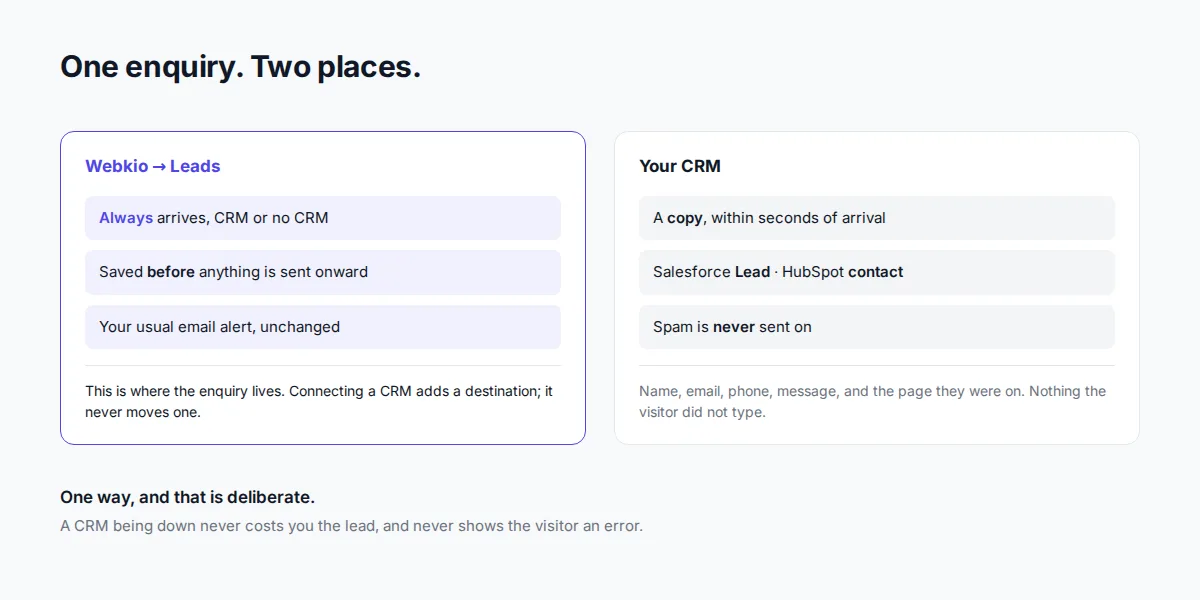
It is a copy, not a move. Enquiries keep arriving in your Inbox exactly as before, and nothing you already have is changed.
Setting it up
You need a Growth Business or Agency plan. Then, for the site you want:
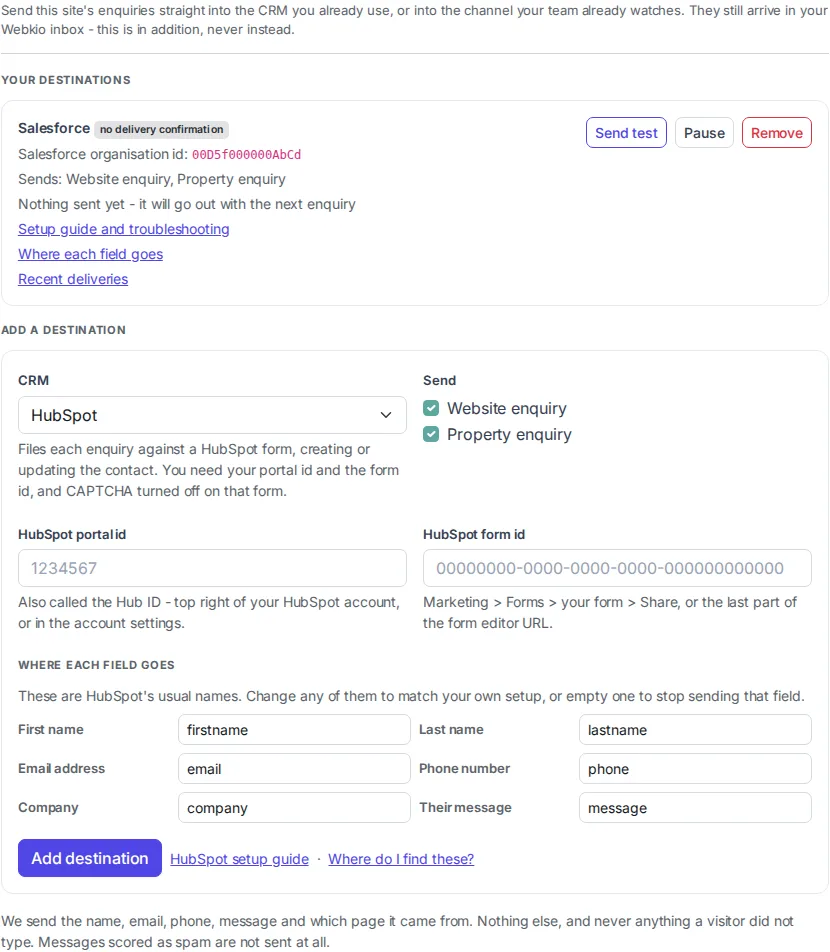
- Open Project settings → CRM.
- Choose your CRM.
- Paste the one or two values it asks for. Each field says where to find it in your own account.
- Tick which enquiries to send.
- Check Where each field goes, if your setup is not the standard one. It is prefilled, so you can usually leave it alone.
- Add destination.
The step-by-step for each CRM, including where those values live and what can go wrong, is on its own page: Salesforce and HubSpot.
You can add more than one destination to a site, and each one chooses its own enquiries.
Where each field goes
Every CRM names things differently, and yours may have been renamed again by whoever set it up. So rather than demanding your system match ours, each destination has a small table: our field on the left, the name it should use in your system on the right.
| We send | Which by default becomes |
|---|---|
| First name, Last name, Full name | the equivalent name fields |
| Email address, Phone number | the standard email and phone fields |
| Company | the company field, where the CRM has one |
| Their message | the long-text or description field |
| Page they were on | a website or URL field |
| Which of your sites, What they did | usually nothing, unless you point them somewhere |
Three things worth knowing about it:
- It is prefilled with the names that CRM normally uses, so if you have not customised anything you can ignore the whole panel.
- Emptying a box stops that field being sent. That is how you deal with a table that has no Phone column, or a field you would rather not store.
- It can be changed later, on the destination itself. Which is usually when you need it: you find out a name is wrong when the first enquiry fails, not while setting up.
Custom fields work too, where the CRM allows it. Salesforce takes a custom field's internal 00N...
id as a name; HubSpot takes your own property names; an Airtable table is entirely your own columns
and nothing else. The per-CRM pages say exactly where to find those names.
Only CRMs take a mapping. A Slack message is not a record, so there is nothing to point at, and the JSON webhook sends a fixed shape because something of yours is already reading it.
Which enquiries are sent
| Enquiry | Sent |
|---|---|
| Contact form on any page | Yes |
| Property enquiry on a listing | Yes |
| Shop orders | No |
| Bookings and rental reservations | No |
| Newsletter sign-ups | No |
| Anything scored as spam | No |
Orders and bookings are left out deliberately. A CRM Lead is a person who has asked a question and has not bought yet, and filing a paying customer as a new Lead puts them into a sales pipeline they have already come out of the far end of. If you want those in your CRM, they belong on a different object than the one this writes to.
Spam is never sent. If a message is scored as spam it stays out of your CRM entirely, which is the one place a false positive costs you nothing and a false negative costs you a cluttered pipeline.
What is sent, and what never is
Sent: the person's name, email address, phone number, their message, which of your sites it came from, and the page they were on when they wrote it. A property enquiry also carries the property's title, its reference and the kind of enquiry.
Never sent: anything the visitor did not type. We do not attach your other contacts, your orders, your customer records, your files, or any data from elsewhere in your account. One enquiry goes out, and nothing else goes with it.
If the form collected extra fields of your own, those travel too, as plainly labelled lines.
How to tell it is working
Send test is the quickest answer, and for some CRMs it is the only real one. It sends a clearly marked lead called "Webkio Test" straight away and tells you what your CRM said about it. Go and delete that record afterwards: it is a real one.
It is worth pressing even when everything looks fine, because the thing it catches cannot be caught any other way. We check the SHAPE of what you paste, so a pasted web address is refused on the spot. What we cannot check is a perfectly well-formed id belonging to somebody else's account: that is accepted by us, accepted by them, and quietly goes nowhere. Sending one and looking is the only test there is.
A failed test never counts against the destination, so you can press it as often as you like.
Recent deliveries on the card is where to look when an enquiry did not turn up. It lists the last twenty attempts and, for each, who the enquiry was from, whether it was delivered or failed, the provider's own error, and how long it took. "Three deliveries failed on Tuesday" is not something you can act on; "Ada Lovelace's enquiry did not reach Salesforce" is.
Every failed one has a Send again link. Fix whatever was wrong - a column name, a revoked token - and press it, and that enquiry goes through the same path as a new one. You never lose the enquiry itself either way: it is in your Inbox from the moment it arrives, whatever happens afterwards.
The card itself is deliberately blunt:
- Nothing sent yet means exactly that. It is not an error, and it is not a confirmation either. It changes the first time a real enquiry arrives.
- Last lead sent ... with a date is the normal state.
- Last attempt failed: ... carries the CRM's own error message, not ours.
- Switched off after repeated failures appears after ten failed attempts in a row. Nothing is sent until you fix the problem and press Resume, which clears the count. You are told when this happens - a notification arrives in Webkio naming the CRM and the reason - because the first sign of a revoked credential should not be leads that never turned up.
A destination that has gone quiet because a credential was revoked looks different from a quiet week. That distinction is the whole reason those lines exist.
Why a success message is not always proof
Some CRMs answer the same way whether or not they stored what you sent. Where that is true, the destination carries a no delivery confirmation badge, and the only honest check is to look in the CRM itself after your next real enquiry. We will not show you a tick we cannot stand behind.
When something fails
Each enquiry is sent to each destination once. If a retry happens after the CRM had in fact accepted it, we know, and it is not sent again - so a slow or flapping connection does not leave you reconciling duplicates by hand.
A failure that might pass on a second attempt is retried automatically, with increasing gaps: a timeout, a rate limit, or the CRM being down. A failure the CRM has already judged - a wrong id, a form it will not accept, a field it does not recognise - is recorded against the destination and not retried, because sending the identical thing again in ten minutes would get the identical answer.
Either way the enquiry itself is safe. It is in your Webkio inbox before any of this starts, and a CRM being unreachable never costs you the lead or shows the visitor an error.
What this does not do
- It is one way. Nothing comes back. Editing a Lead in your CRM, marking it won, or deleting it changes nothing in Webkio, and nothing in Webkio changes it.
- It creates, it does not update. Each enquiry is sent as a new record. It does not look for an existing one, merge duplicates, or attach to an account you already have.
- It writes to one object. Leads, or their equivalent. Not opportunities, not deals, not custom objects.
- It sends the fields you point it at. Every destination has a Where each field goes panel: our fields on the left, the name each one should use in your system on the right. Change any of them to match a renamed property or a custom field, or empty one to stop sending it.
If you need any of those, you need a full CRM integration rather than this one, and it is worth saying plainly rather than discovering it in month two.
If you move to a plan without this
Your destinations stop sending, and that is all. You can still see them and still remove them, on any plan, because they hold a credential of yours and you should never have to pay to revoke one. Adding a new destination is the part that needs Growth Business or Agency.
Removing a destination
Pause stops new enquiries being sent and keeps the setup. Remove deletes it entirely. Neither touches anything already in your CRM: records you have been sent are yours and stay where they are.
Frequently asked questions
Do enquiries still arrive in Webkio if I send them to a CRM?
Yes. This is a copy, not a redirect. Every enquiry appears in your Inbox exactly as it did before, and the email alert you already get is unaffected.
Can I send to more than one CRM?
Yes. Add a destination per CRM. Each one chooses its own enquiries, so you can send contact-form enquiries to one and property enquiries to another.
Will a change in my CRM come back to Webkio?
No. This only sends. A Lead marked won, edited or deleted in your CRM is invisible to Webkio.
Where do I see the enquiries that did not get through?
Recent deliveries, on the destination. Each failed row names the person it was for and carries a Send again link. The enquiry itself is always in your Inbox regardless, so nothing is ever only in the CRM.
What happens to enquiries that arrive while my CRM is down?
They are retried automatically for a while. The enquiry is already saved in Webkio either way, so nothing is lost even if every attempt fails - and a retry that follows an attempt the CRM had quietly accepted will not send it a second time.
Does the visitor notice any of this?
No. Sending happens after their enquiry is saved, so the form answers them at the same speed whether or not a CRM is connected, and a CRM being down never shows them an error.